How to sell tickets to an online workshop, step by step
In 2023, Maven co-founder Gagan Biyani described what happened when instructors on Maven ran one-day workshops before their full courses. One instructor charged $19 for a workshop, and 11% of the people who bought a ticket went on to buy the full course. Another ran a free workshop that brought in 1,000 email signups, and 2% of them, 20 people, bought the course. Biyani also wrote that Maven's one-day workshops, sold as products on their own, "simply didn't make enough revenue to justify the cost."
 By Ryan Scott, founder of LockersUpdated November 6, 20266 min read
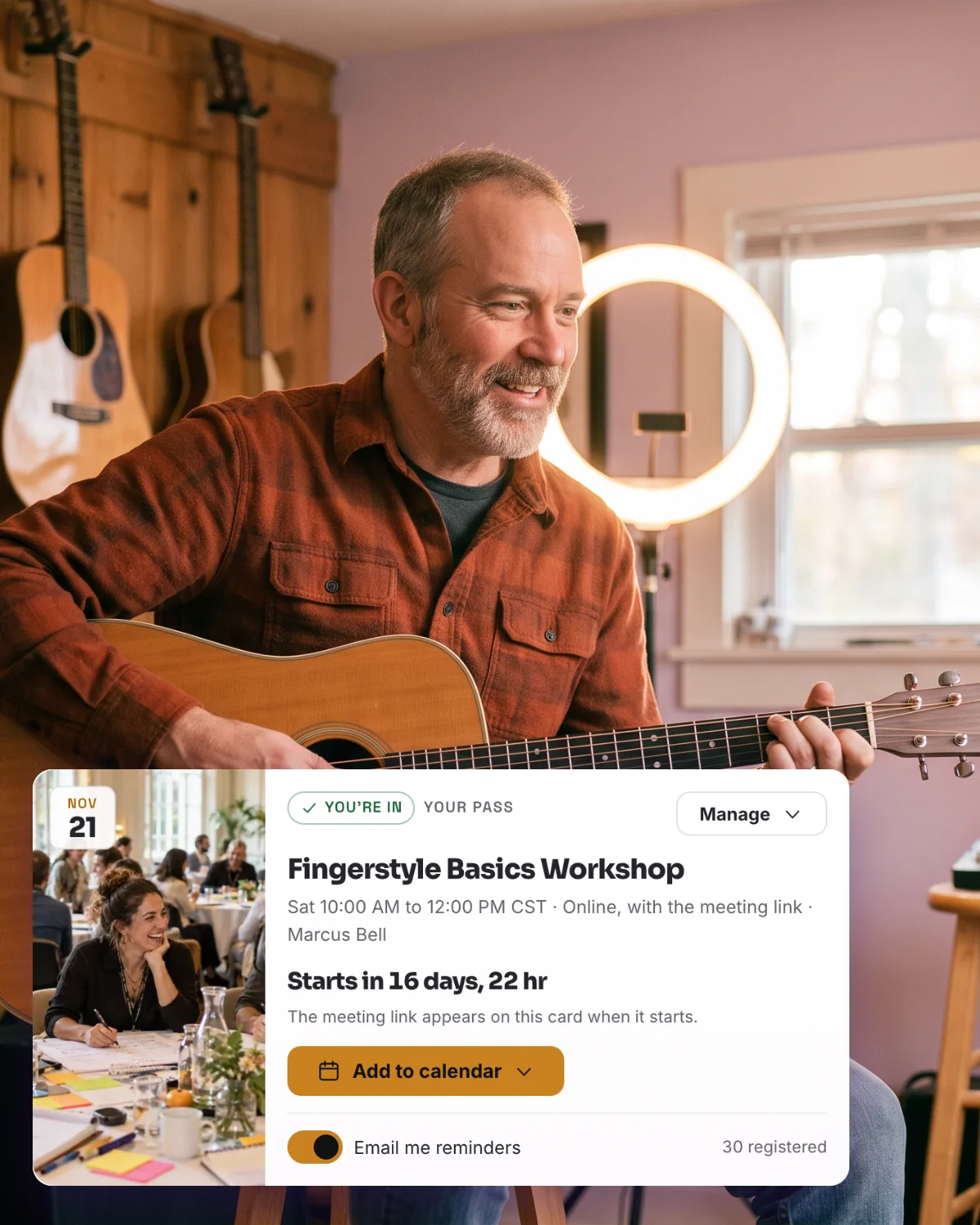
Promise one result your buyers can use the same day
In both of his examples, the workshop led people into a full course. So plan your workshop around the course you will offer at the end, and sell the ticket from an event page that takes payment through Stripe and gives you each buyer's name and email for the follow-up. On Lockers, ticket sales start on Basic at $7 a month, with a 5% fee on each ticket.
A workshop sells when its title names one thing a person will be able to do when it ends, such as "Write your first sales email in 90 minutes" or "Price your coaching packages." Pick a result that fits in 60 to 120 minutes of teaching and practice, and that leads into your longer course or coaching. Buyers who finish the workshop have seen how you teach by the time you make the course offer.
Price the ticket for its place in your offers
Biyani reported that one-day workshops on Maven were priced at about $200 to $500, compared with $700 to $3,000 for full courses. A workshop priced in that range is a product on its own and needs to deliver a full result. A lower price, such as the $19 example above, asks buyers for a small payment and keeps the ticket well below the price of the course you offer at the end.
Before you settle on a number, check what each ticket leaves you with. On a $50 ticket:
| Where you sell | Platform fee on one $50 ticket | Payment processing |
|---|---|---|
| Lockers Basic | $2.50 (5%) | Stripe's processing fee |
| Lockers Pro | $0.50 (1%) | Stripe's processing fee |
| Eventbrite | $3.64 (3.7% plus $1.79 per ticket); buyers pay it by default, and you can choose to absorb it | 2.9% per order |
| Luma, free plan | $2.50 (5%) | Stripe's processing fee |
Lockers Basic costs $7 a month, and Pro costs $67 a month. On 20 tickets at $50, Basic's 5% comes to $50, and the other $950 goes to your Stripe account before Stripe's processing fee.
Set up the ticket on Lockers
Ticket sales on Lockers start on Basic, at $7 a month or $70 a year for your Locker. You need an authenticator app on your Lockers account, and the owner of the Locker connects Stripe before tickets can go on sale.
Create your Locker at lockers.social/start, or open the one you already run, and choose Basic or Pro from Admin.
Open Admin, then Sales, then Payments, and select Connect Stripe. Finish the details Stripe asks for, so your account is ready to accept payments and send payouts.
On Calendar, select New event and enter the workshop's title. Under How it happens, choose External link and paste the meeting link from Zoom, Google Meet or the tool you use. Set the date, start time, length and time zone.
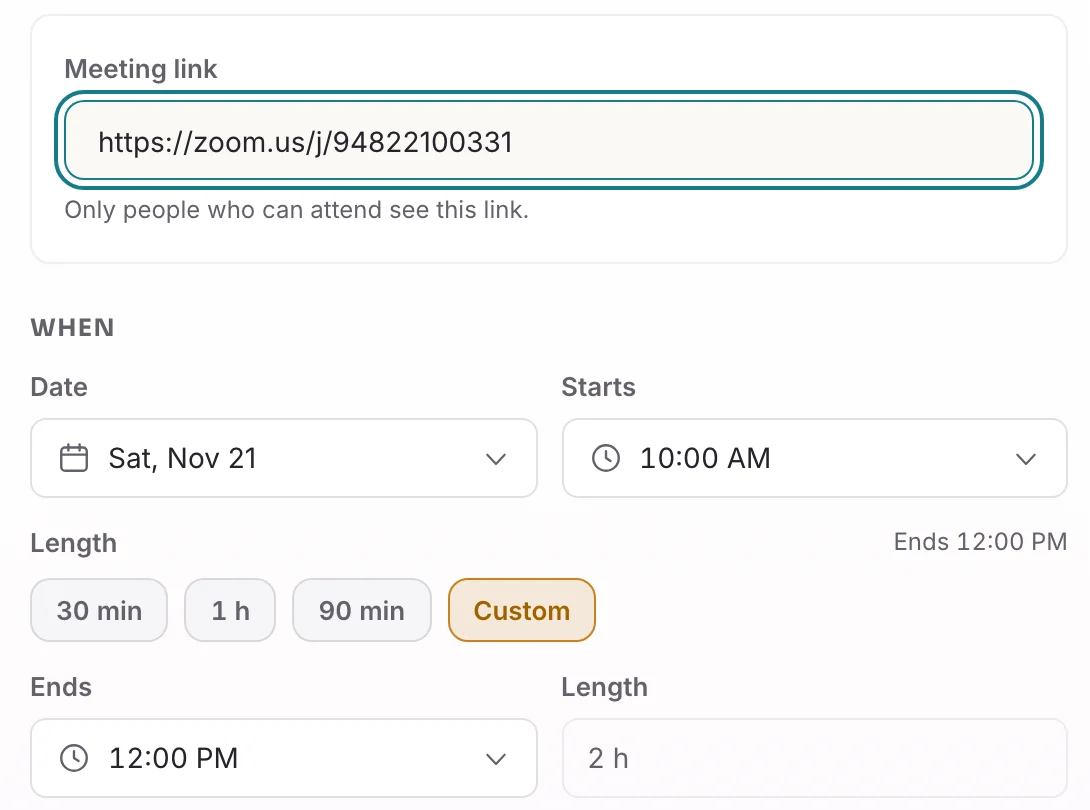
Paste the meeting link, then set the date, start time and length. Select Access settings. Under "Who is this event for?" choose "Members come free. Guests buy a ticket." In a Locker that is free to join, you can choose "Everyone buys a ticket" instead, so members pay the same price as guests. Enter the Ticket price, anywhere from $1 to $10,000.
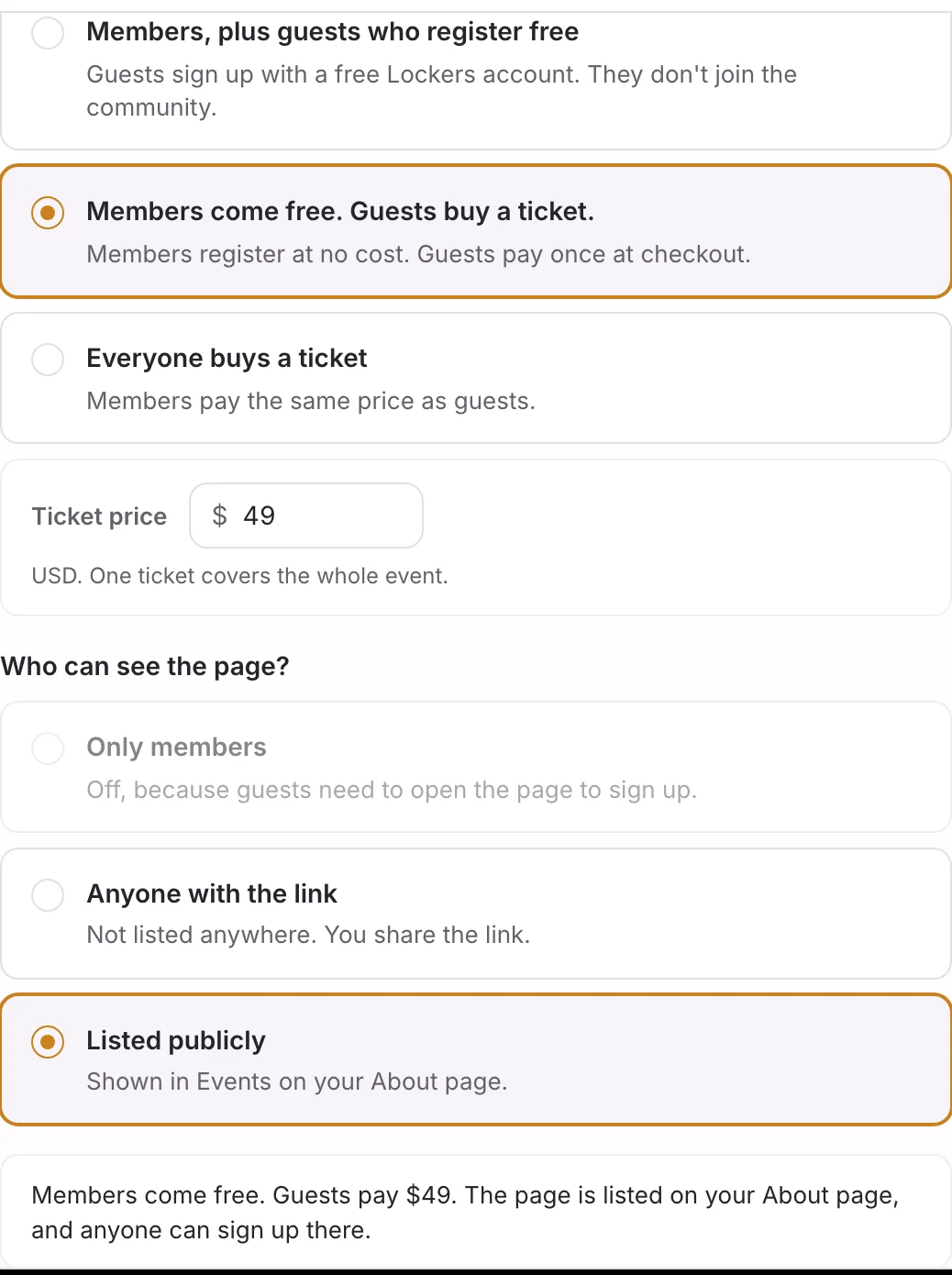
One ticket covers the whole event, and the summary at the bottom reads back what you chose. Under "Who can see the page?" choose Listed publicly, so the workshop appears in Events on your community's About page, or Anyone with the link.
Select Create event, then edit the event and add a Description of what people will be able to do when the workshop ends.
Promote the event page for three weeks before the workshop
Share the event page in your newsletter, and send it in personal messages to people who have asked you about the topic. Put the result in one sentence, the date and time, the price and the link in each message. The start time is the real deadline, so say it plainly in every message.
A buyer who opens the page selects Sign in to get a ticket and signs in or creates a free Lockers account. Back on the event page, they select Get a ticket, tick the terms box and select Continue to payment, then pay on Stripe's checkout page. Their ticket registers them for the workshop, and their pass appears on the event page and under Your events.
Lockers emails reminders to ticket holders before the workshop
Remind me by email starts switched on in the ticket sheet, so Lockers emails each buyer about a day before the workshop and again 15 minutes before it starts. Someone who buys within the last day gets the 15-minute email. Each email has an Open your event button that takes them to the event page, where the meeting link appears for everyone with a ticket. You do not need to send the link yourself or keep a separate list of who paid.
Make the next offer at the end of the workshop
Spend the last ten minutes on the course or coaching program that continues the work, and show buyers how it builds on what they practiced in the workshop. Give the price and start date, and put the link in the meeting chat while you talk.
After the workshop, open the event's People tab and select Download CSV. Each ticket buyer appears with their name and email, and purchase in the source column. Buying a ticket covers the workshop only, so to bring buyers into the Locker where you sell your course, copy your Invite link from Admin, under Settings, then General, and send it in your follow-up message with the course offer.
Refund a ticket and tell buyers about changes
Ticket holders see Contact the host for a ticket refund on their pass, and the owner issues the refund. Open Admin, then Sales, then Payments, find the order under Orders and refunds, select Refund payment, enter the Refund amount (USD) and select Issue refund. A full refund removes the buyer's ticket and registration, and a partial refund keeps them. Lockers returns its fee in proportion to the amount refunded, and Stripe's processing fee follows Stripe's rules.
After you change the time or details, download the CSV from the People tab and email your buyers the update. If you change the ticket price, everyone who already bought keeps their ticket.
Run a multi-session workshop on Pro
On Pro, at $67 a month, you can build a workshop with several sessions in the schedule builder, and one ticket covers every session. You can also host the sessions in the Live room inside your Locker, for up to 100 people at once counting hosts, with 200 attendee-hours included each month. Record new sessions starts switched off on the builder's Settings step, so switch it on, or switch on Record automatically for a session, before that session starts. Afterward, choose Keep replay, and ticket holders who still have access to the event can watch the replay from the event page once it processes. The Lockers fee on Pro is 1% of each ticket.
Create your Locker free at lockers.social/start, choose Basic from Admin for $7 a month, connect Stripe and set your ticket price.
Related guides

How to sell tickets to an event
Charge for an event with one ticket that covers every session, and choose whether members attend free. A ticket covers that event only and does not join the buyer to your community.5 min read
How to create an event and choose who can see it
Use the New event sheet to add a one-session event or start a multi-session draft on Pro, and choose who can attend and who can open the page.5 min read