

Your name, colors, and web address on every screen your members see.
Pick a preset and set your accent color, then upload your cover and logos. On Pro your Locker runs at your own domain, and our name stays off your posts and out of your feed.
Free plan, no card. The custom domain comes with Pro.
- 6theme presets
- 4layouts
- Onecustom domain per Pro Locker
- 14days of routing if Pro ends
One preset sets the look of every screen in the app.
A preset sets the background color, the corner radius, the brand typeface, the tab style, and whether each post has its own bordered card. The five are Plates, Ink & Air, Graphite Plate, Serif Signal, and Anchor & Header, and each one has a dark and a light version. Appearance in Admin previews the change on your own feed before you save it.
- Plates, Ink & Air, Graphite Plate, Serif Signal and Anchor & Header
- Your cover image, a logo for dark and one for light, your name and tagline
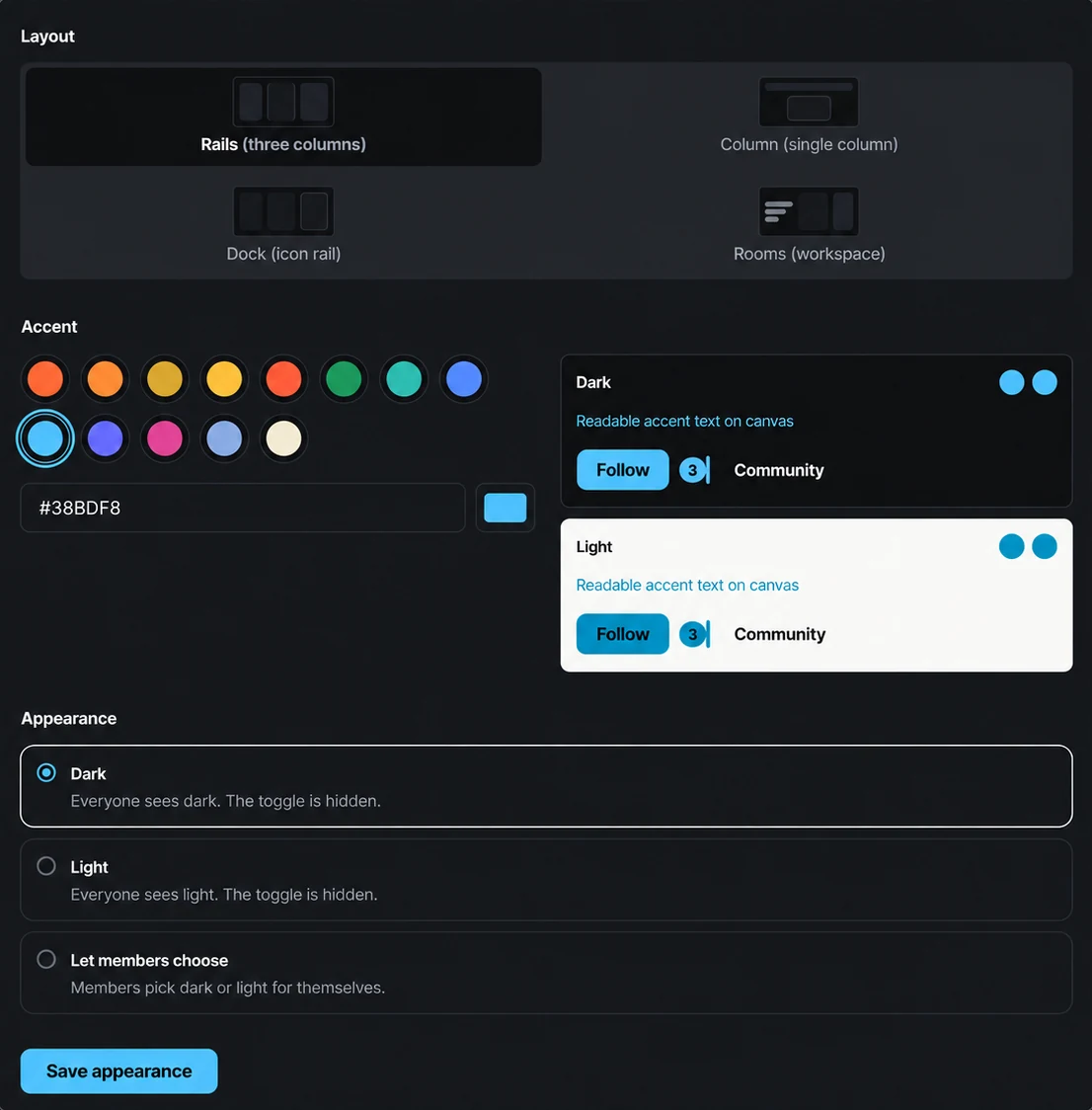
- Dark, light, or let each member choose
Four layouts, chosen separately from the preset.
Layout is a separate choice from the preset. The default is Rails, with navigation, feed, and a rail side by side. The other three are Column (a single centered feed), Dock (an icon rail in place of the navigation), and Rooms (a list of rooms with previews). Every preset renders under every layout, and a change leaves every post in place.
- Rails, Column, Dock and Rooms
- Change it any time and every post stays where it is
Paste one color and Lockers keeps the text readable in both modes.
Paste one hex into the accent field and Lockers derives the rest: the fill, the hover and active states, the link color, the tint behind unread counts, and a foreground color that is legible on the fill. The fill and the accent text are checked against your background, so accent text meets the WCAG 4.5:1 contrast ratio and the fill meets 3:1 in dark and light mode. A color that would fall short on one background is adjusted before it is applied.
- Any hex, or start from a swatch
- Separate scales derived for dark and light
One custom domain per Pro Locker, verified from Admin.
Add your domain in Admin and copy the records Lockers shows into your DNS. Once the records resolve, the card reads Verified and the certificate is issued and renewed for you. Members use your domain from then on. The hosted lockers.social address forwards to the domain and keeps the page path, so links shared before the change still open the same page.
- One custom domain per Pro Locker, subdomain or apex
- DNS records shown in Admin, certificate managed for you
- Routing continues for 14 days if Pro ends
Export posts, comments, courses, and files as a ZIP.
Community export packages posts, comments, courses, and uploaded files as a ZIP, in resumable numbered parts when the archive is large. Native video is listed as a reference and is not bundled. Private messages, private learning and Audience records, and billing data are excluded. The domain is registered to you at your own registrar.
- Owner-run from Admin, no support ticket
- Resumable parts with checksums for a large community
What members notice
Members do not open the Appearance screen. What reaches them is the address they type and how the page looks on their phone.
They open your address
A member opens your domain and gets the cover, the logo, and the tagline you set. The posts have no platform badge.
They read in their own mode
One member keeps the community in dark mode and another prefers light, and each choice is remembered in their own browser. You can lock one mode for everyone.
Signing in brings them back
Selecting Sign in takes a member to lockers.social and returns them to the page they started on. A member already signed in there sees two quick redirects and no form.
What Free and Pro include
All five presets, all four layouts, the accent color, logos, and the cover image are on the free plan. Pro adds your own web address.
per Locker, forever
- Brand colors and layouts
Use your brand colors and preferred layout, with dark or light mode for members.
- Your cover, logos and tagline
Upload a cover image, a logo for dark and one for light, and the line that sits under your community name.
- No Lockers badge
No badge on your posts and no logo in your feed.
Details
A free Locker lives at a name.lockers.social address, and that address is the only place our name appears.
- Community content export
Download supported community records and uploaded files as a ZIP archive.
$49 a month or $470 a year per Locker
- Your own domain
Run your community at your own web address, with a secure connection managed for you.
Details
Connect one domain to each Pro Locker. Its lockers.social address forwards to your domain.
- Old links keep working
Your hosted address forwards to the domain and keeps the page path, so shared links and bookmarks still open the right page.
- Owner control on the domain
Only the owner can add, replace, or remove a domain, and we ask for an identity confirmation first. Admins can see the status.
- A grace period if Pro ends
Your domain keeps routing for 14 days, then the hosted address takes over. The domain stays yours and reconnects when you upgrade again.
Sign-in always passes through lockers.social and returns to your domain. That one step cannot be moved onto your own address.
What is not included: full white labeling
The domain, colors, logos, and layout are yours, and we keep our name off your posts and out of your feed. Our name still appears when a member signs in, because sign-in runs through lockers.social and returns to your address, and community notification email sends from our servers as your community name with your Reply-To. There is no custom CSS, no uploaded typeface, and one domain per Locker. If the requirement is that the word Lockers never appears at any point, we are the wrong fit.
The questions asked most often
Do you put your branding on my community?
No badge on your posts and no logo in your feed. On Free, a name.lockers.social address is the only place our name shows up, and a Pro Locker runs on your own domain. Our name stays in two places on purpose: sign-in runs through lockers.social and returns members to your address, and notification email leaves our servers as your community name with your Reply-To. When you sell, payment is handled by Stripe, which is another step outside your community.
Can I use my own domain on the free plan?
No. A custom domain is part of Pro, one per Locker, and only the owner can connect it. A free Locker runs at the name.lockers.social address you choose when you create it. Connecting a domain later moves nothing: the posts, courses, members, and files stay where they are.
What happens to my domain if I stop paying for Pro?
Your Locker drops to the free-plan limits and nothing is deleted. The custom domain keeps routing for 14 days, then visitors are sent to your name.lockers.social address and sign in again there. The domain is still yours at your registrar, and it reconnects when you upgrade.
Can I add custom CSS or my own fonts?
No. The presets set the typeface, corners, and spacing, and the accent scale is computed from your hex against each background. That is what lets us release changes to the app and keep the look you chose, and it is how the contrast minimums are met for every color a community picks.
Other feature pages
Start free and connect your domain on Pro
Start free with a preset and your accent color. Connect your domain when you move that Locker to Pro.