

Posts, replies, and messages under your community's name.
Every post is filed under a category you name, so a new member can read the welcome post and find the older threads. When someone replies to a member, the notification email comes from your community with your own reply address on it.
Free plan, no card.
- Unlimitedmembers on Free
- Unlimitedcourses on Free
- 1 GBof file storage
- 120 minutesof stored video
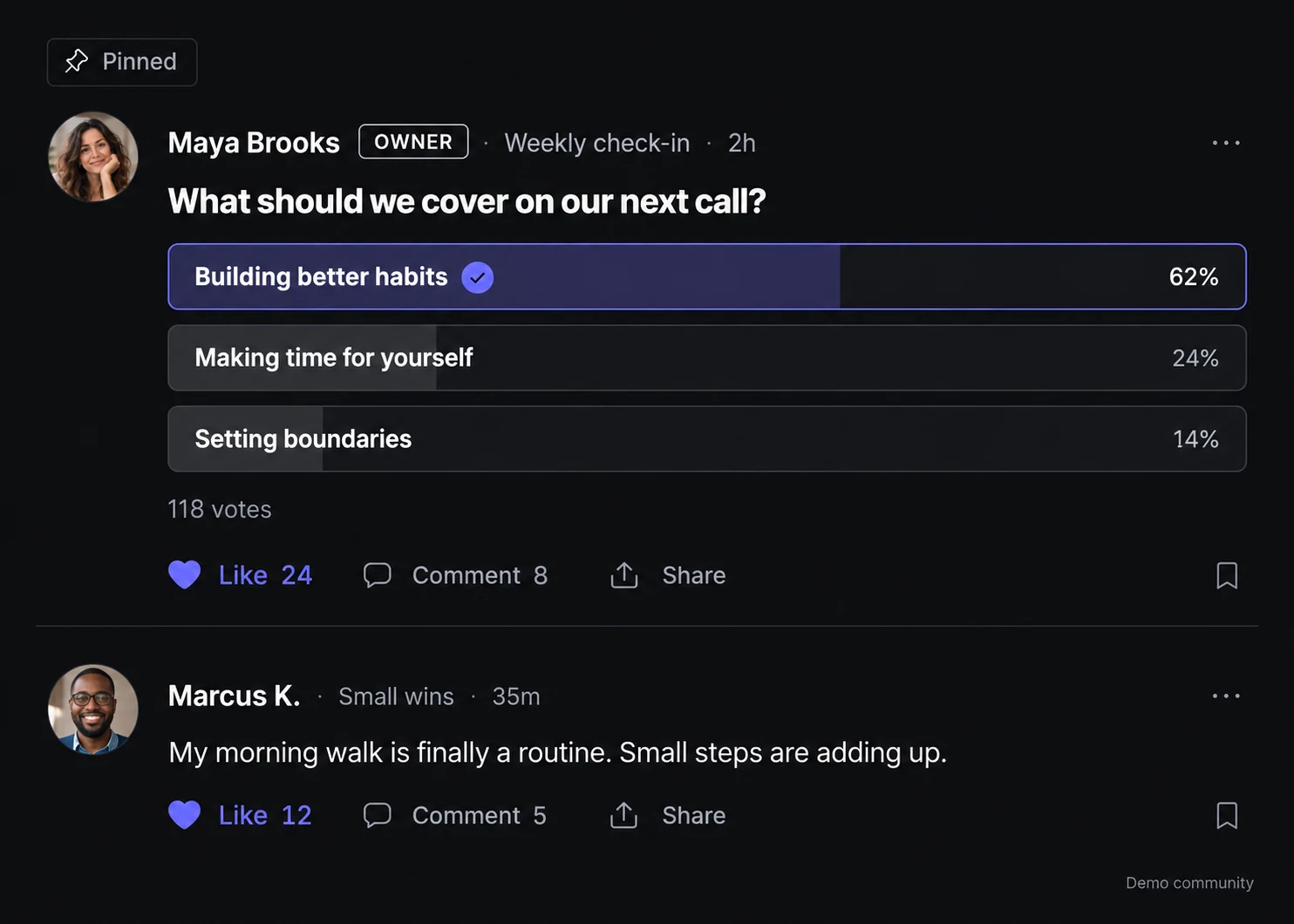
A post can carry images, a video, a poll, or a GIF.
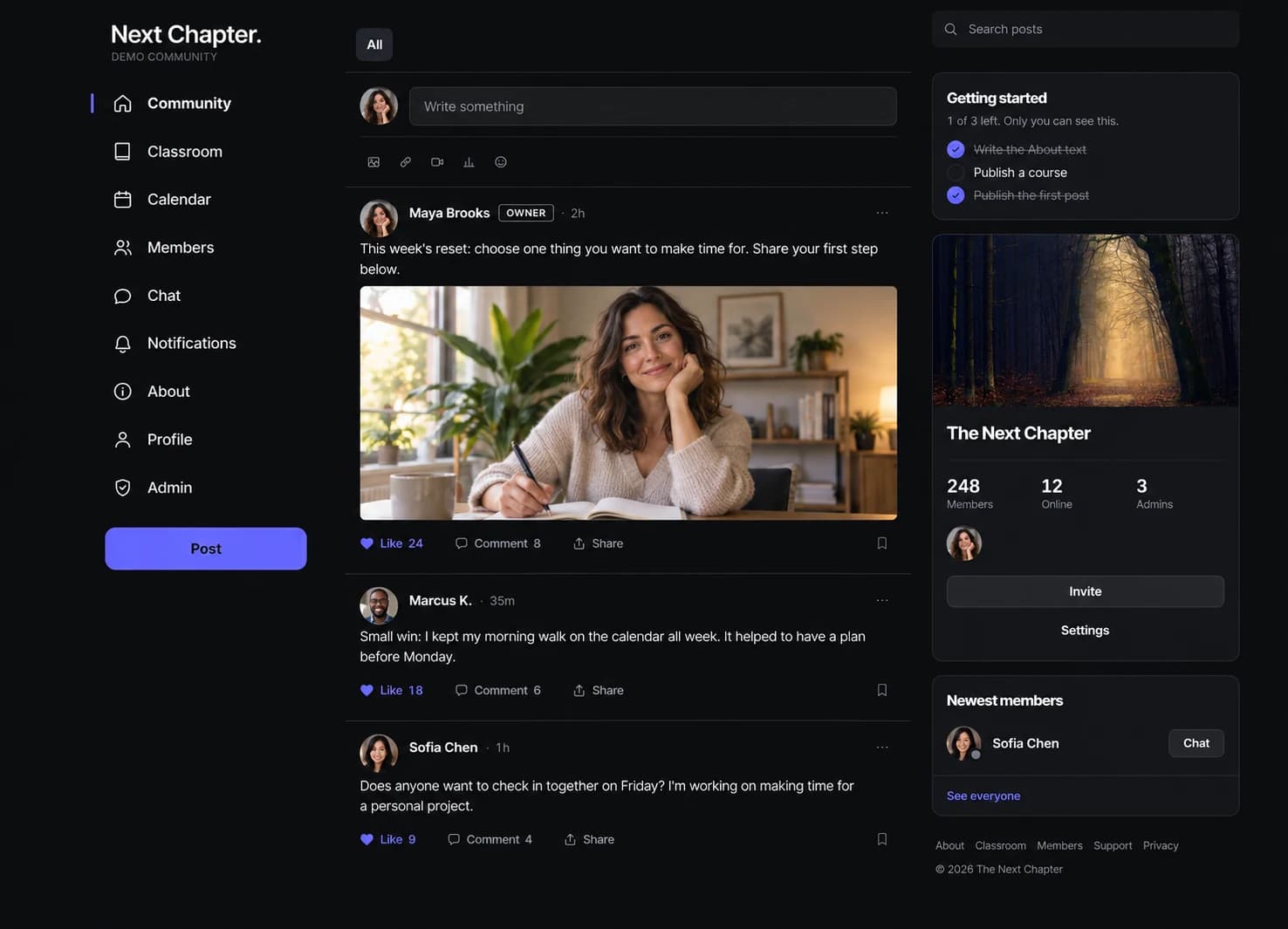
A post has a title and a body, and it can include up to four images, an uploaded video, a YouTube embed, a poll, or a GIF. Members like and comment. Staff can pin a post to the top of its tab, and search covers the whole feed. Each post is filed under one of the categories you named.
- Up to four images, native video, or a YouTube embed
- Polls, likes, comments, and pinned posts
- Post search across the whole feed
Paste a link and the post gets a preview card.
Paste a link into the composer and Lockers builds a preview card from the page, with a choice of which image the card uses. The same composer accepts a GIF from GIPHY, a poll with two to six options, an image or video upload, or plain text. The category is chosen in the composer before the post goes out.
- Link previews with your choice of image
- GIFs, polls, images, and video in the same box
Pin a welcome post to the top of any category.
Categories appear as tabs across the top of the feed, with the names you gave them. A pinned post stays at the top of its tab, which is where a welcome post for new members belongs. Any category can be limited so that only moderators, admins, and owners post in it, which limits that tab to announcements from staff while the others stay open to members.
Members find each other by name and message privately.
The directory lists each member's name, photo, role, and whether they are online now, and each profile has a short bio. From a profile, a member opens a one-to-one message. Messages also holds private groups of up to 50 people in the same Locker, and an unread count shows when a message is waiting. Blocking and reporting are on the same screens.
- Profiles with a photo and a short bio
- Owner, admin, moderator, and member roles
- One-to-one and group messages with unread counts
You decide who joins, and approve a page of requests at once.
A free community can require approval to join. Each request is then listed in Admin with Approve and Decline beside it, oldest first, and a page of requests can be approved at once. People arrive through an invite link or through individual invitations sent from the same screen. Roles are changed from the member list, and member reports arrive in Moderation.
- Approval-required joining on free communities
- Invite link or individual invitations
- Removals, bans, and ownership transfer
What a member sees after they join
Most members never open Admin. The parts they use are the feed, their notifications, and their own profile.
One account for every community
Signing in passes through lockers.social and comes straight back, on your own domain if you have one. The same account works in every Locker a member belongs to, so they keep one password.
A notification when someone replies
A member gets a notification when someone replies to them. Browser push for those replies is optional and off until the member turns it on. Email goes out as your community name via Lockers, and a reply to it goes to your Reply-To address.
Private messages
Two members can message each other, and a member can start a private group with up to 50 people from the same Locker. Neither person has to share an email address. A member can block someone on their own, which stops a one-to-one chat and stops either person from adding the other.
What Free and Pro include
Free includes the feed, the directory, and direct messages, with no member count cap. Pro raises the file allowance and adds your own domain.
per Locker, forever
- Unlimited members
Your community on a lockers.social address.
- Community feed
Post updates and run polls, with categories and pinned posts to organize discussions.
- Direct messages
Let members have private one-to-one and group conversations.
- Member directory
Help members find one another and identify your community's owners and admins.
- In-app notifications
Let members see when someone replies to them inside Lockers.
$49 a month or $470 a year per Locker
- Unlimited members
The same member count as Free, with a higher file allowance.
- 25 GB of file storage
Plus 1,200 minutes of stored video, tracked separately.
- Your own domain
Run your community at your own web address, with a secure connection managed for you.
Details
Connect one domain to each Pro Locker. Its lockers.social address forwards to your domain.
- API and webhooks
Connect other tools to member, course, event, and post activity.
Every feature on this page is included on Free. Free file storage is 1 GB, and stored video is a separate allowance.
What the feed does not include
There are no channels. Discussion for the whole community stays in the feed under the categories you name. Private messages are one-to-one chats and groups of up to 50 people in the same Locker. A group message is text up to 2,000 characters, with no attachments, reactions, message editing, or email. There is no setting that makes the whole feed announcements only; a category limited to staff does that for one tab. We have not built bookmarks, digest emails, or a preference center where each member sets their own notifications. Moving a community from another platform means inviting the people by link or individual invitation, because posts have to be written again.
The questions asked most often
Can I organize the feed into channels?
You name your own categories and they appear as tabs across the top of the feed, with every post filed under one of them. A pinned post stays at the top of its tab, and search finds older posts.
Do people need approval to join?
That is your setting. A free community can be open to anyone holding the invite link, or set to approval, in which case each request waits in Admin until an owner or admin approves or declines it. You can also skip the link and send individual invitations from the same screen.
Can I charge people to be in my community?
Selling is available after the Locker owner connects a Stripe account and completes payment setup. Paid membership runs on Pro at a monthly or annual price and includes every course in that Locker. The Selling page covers the fees and how access works when someone cancels.
Can I move a community I already have?
Members, yes: share an invite link, or invite people one at a time from Admin. On Pro, a connected tool can send invitations for you through the API. Posts and courses have to be recreated, because we have not built an importer.
Other feature pages
Start your community on the free plan
Start on your own lockers.social address and name a few categories. Then invite the people who will post in the first week.