How to turn your book into an online course, chapter by chapter
Pat Flynn built a free companion course for his 2016 book Will It Fly? in about a day and a half. By the time he reported the numbers in 2019, 26,680 people had enrolled in it, and he estimated that close to half of his book buyers had joined. His separate paid course had 1,684 students and $215,308.71 in sales. The book itself had earned $244,032.29, including foreign rights.
 By LockersUpdated November 25, 20264 min read
Decide which course your book becomes first
Flynn's numbers show two courses a book can become. A free companion course gives readers worksheets and walkthroughs to use with the book, and every reader who joins it is a reader you can reach directly. A paid course adds practice and feedback on the steps the book teaches. The Authors Guild's 2023 income survey found that full-time authors had a median book income of $10,000, and a median of $20,000 once other author-related work such as editing, teaching, speaking and book coaching was included. A paid course lets you sell that teaching to every reader of the book.
Start with the free companion course if your book is new or your reader list is small. It costs readers nothing, so you can mention it inside the book itself and on your author page, and the readers who join are the first people you tell when the paid course opens. Start with the paid course if readers already write to you asking for more help than the book gives, because those requests tell you what the course has to cover.
Label each chapter as a lesson, split, worksheet, cut or new part
Open your table of contents and give each chapter one of five labels.
Lesson: the chapter teaches one thing a reader can do. Turn it into a lesson that shows how to do it and asks the reader to try it.
Split: the chapter teaches several things. Turn each one into its own short lesson.
Worksheet: the chapter holds a checklist, template or framework. Turn it into a download the reader fills in.
Cut: the chapter tells the story behind the idea or sets up the argument. Leave it in the book, so every lesson ends with something the reader does.
New: the course needs a part no chapter covers, such as a demonstration or a worked example. Add it.
For each lesson, write one sentence about what the reader will be able to do when it ends. Those sentences become your lesson titles and, together, the promise on your course page.
Build the course in Course studio
Create your Locker at lockers.social/start, or open the one you already run. In the Classroom, select New course, and Course studio opens a draft with Module 1.
Open Course details, add the title and the About text, and choose a Cover, such as your book cover.
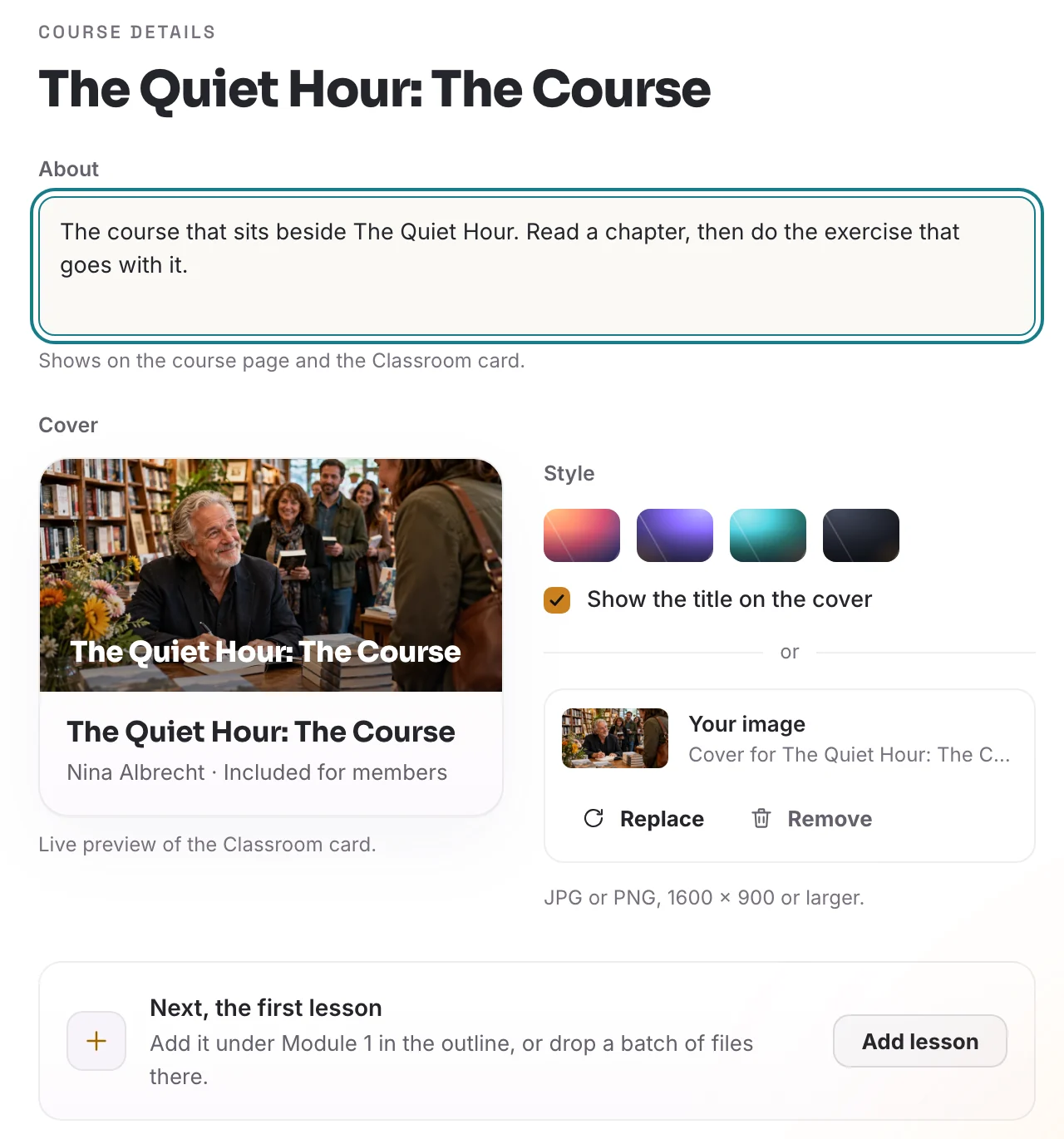
Course details shows a live preview of the Classroom card as you add the cover. Add a module for each group of related chapters, and drag files onto Drop files to make lessons. Each file becomes one lesson, and files other than video can be up to 16 MB each: a PDF becomes a lesson with a PDF viewer, an MP3 becomes an audio lesson, and a Word (.docx), Excel, PowerPoint, text or image file becomes a text lesson with the file attached as a download.
In each lesson, add blocks from the insert menu, such as Text, Heading, Callout, Audio, PDF, Download and Button. You can record yourself reading a key passage and add it as an Audio block, in MP3 format up to 16 MB.
Select Preview to see the course as a member will, then select Publish. The first time you publish, Lockers asks Tell members it's out? and offers a post for your feed.
Members move through the course with Complete and continue, their progress is saved, and each lesson has Notes for the reader and a Discussion where readers can ask you questions.
Choose the plan for the course you are building
A companion course made of text, PDFs, audio and downloads works on the Free plan, for members of your Locker, within 250 MB of file storage.
Basic, at $7 a month or $70 a year, adds unlimited hosted video, so you can record each lesson on camera, with each video up to four hours long. Basic also lets you sell the course with a One-time price from $1 to $10,000 in a Locker that is free to join, once you connect Stripe and finish payment setup. The Lockers fee on Basic is 5% of each sale, plus Stripe processing.
Pro, at $67 a month or $670 a year, adds the teaching tools: quizzes with a pass mark, written responses you can review, completion certificates, lessons that open On a date, Earlier lessons first, and an AI tutor that answers readers' questions from your lesson text and any transcript you add. The Lockers fee on Pro is 1% of each sale.
Invite readers to your Locker, then to the course
Put your Locker's address in the back pages of the book, on your author page, in your newsletter and at the end of every talk. Course pages and previews open for members, so readers join your Locker first and then find the course in the Classroom. For a paid course, turn on Free preview for one or more lessons, so members can open those lessons in full before they buy.
On Pro, the course Results show how many readers reach each lesson, so you can see which lesson to rewrite first.
Check your book contract before you publish the course
If a publisher holds your book's rights, read the grant of rights, subsidiary rights and derivative works clauses in your contract before you publish a course built from the book, because those clauses say which new works made from the book the publisher holds. If you self-published, those rights are yours.
Build the lesson for the chapter readers mention most
Create your Locker free at lockers.social/start, open the Classroom, select New course and turn that chapter into your first lesson.
Related guides

How to create a course in Course studio
Start a course from the Classroom, set its title, About text, cover, and address, add the first lesson, and find Students and Results.5 min read
How to build a lesson with video, text, and blocks
Add the lesson video, write and format text, and insert blocks from the + or / menu. On Pro, add a quiz, a written response, and a transcript for the AI tutor.11 min read