How to get your first 100 community members, with one action for each week of the first month
In February 2025, Paul Mills described in a Jatra Club discussion how he started his Slack community: he sent personal invitations to friends, current and former colleagues and LinkedIn connections. "Nearly everyone was interested, but only about 30 actually joined," he wrote, and he passed 100 members in about three months. Lenny Rachitsky started the community for his newsletter in a similar way, telling Common Room that he created a Slack and "invited ~30 people in there."
 By Ryan Scott, founder of LockersUpdated November 13, 20265 min read
Before week 1: give the first members something to join
Both starts began with a small group of invited people, and Paul Mills's early members then invited people from their own networks. If you have no following yet, start with the people you already know, because 30 people who said yes to you directly are enough to start conversations in the feed.
Richard Millington of FeverBee put the risk of launching an empty space in one line in 2008: "No-one turns up to an empty party twice." So before you invite anyone, set up the space so the first person who arrives finds a conversation already underway.
Create your Locker at lockers.social/start. The Free plan includes unlimited members, the feed, events and direct messages, with no card.
In Admin, open Community, then Categories, and create three or four categories that match what your people talk about. Beside each one, set Who can post to All members, or to Moderators, admins, and owners for announcements.
Write a welcome post that says who the community is for and asks each new member to do one thing first, such as introducing themselves. Select Pin to top on the post so it stays above the rest of the feed.
Publish three posts that start real conversations: a question you get asked often, a short lesson and a prompt that asks members about their own work.
Week 1: send 30 personal invitations
Write down 30 people who would get something real from the community: past clients, readers who have replied to you, colleagues and people who have asked you for advice on the topic. Then write to each one by name and tell them why you thought of them.
Your join link is in Admin, under Settings, then General, as Invite link. Select Copy, and keep Membership set to Open, so anyone with the link joins right away. Each person creates a free Lockers account, confirms their email with a code and joins.
To tie an invitation to one person, open Admin, then People, then Invitations, type their email and select Create invitation. Lockers shows an accept link once, and you send it yourself in your own message. The link works only for that email address and expires after seven days.
Each message needs the reason you thought of the person, what is happening inside and the link. A short version reads: "[Name], you asked me about [topic] last month. I've started a small group for people working on [topic], and this week we're talking about [current conversation]. Here's the link if you'd like to join: [link]."
Week 2: schedule a free event that guests can register for
A free event gives people a date to show up for, and it reaches people who are not members yet. On Calendar, select New event. Under How it happens, choose External link and add your meeting link, or choose In person and add the venue, then pick a date in week 3 or 4. Select Access settings. Under Who is this event for?, choose Members, plus guests who register free. Under Who can see the page?, choose Listed publicly, so the event appears in Events on your community's About page, or Anyone with the link.
Guests register free with a Lockers account, without joining your community. Lockers emails each person who registers the day before the event and 15 minutes before it starts. Share the event page in your newsletter and social profiles, and add it to the personal messages you are still sending, since a specific date with a specific topic gives people a reason to say yes now.
After the event, open the event's People tab and select Download CSV. The file lists the name and email of everyone who registered, and each guest should get a short thank-you with your join link.
Week 3: welcome every new member by name
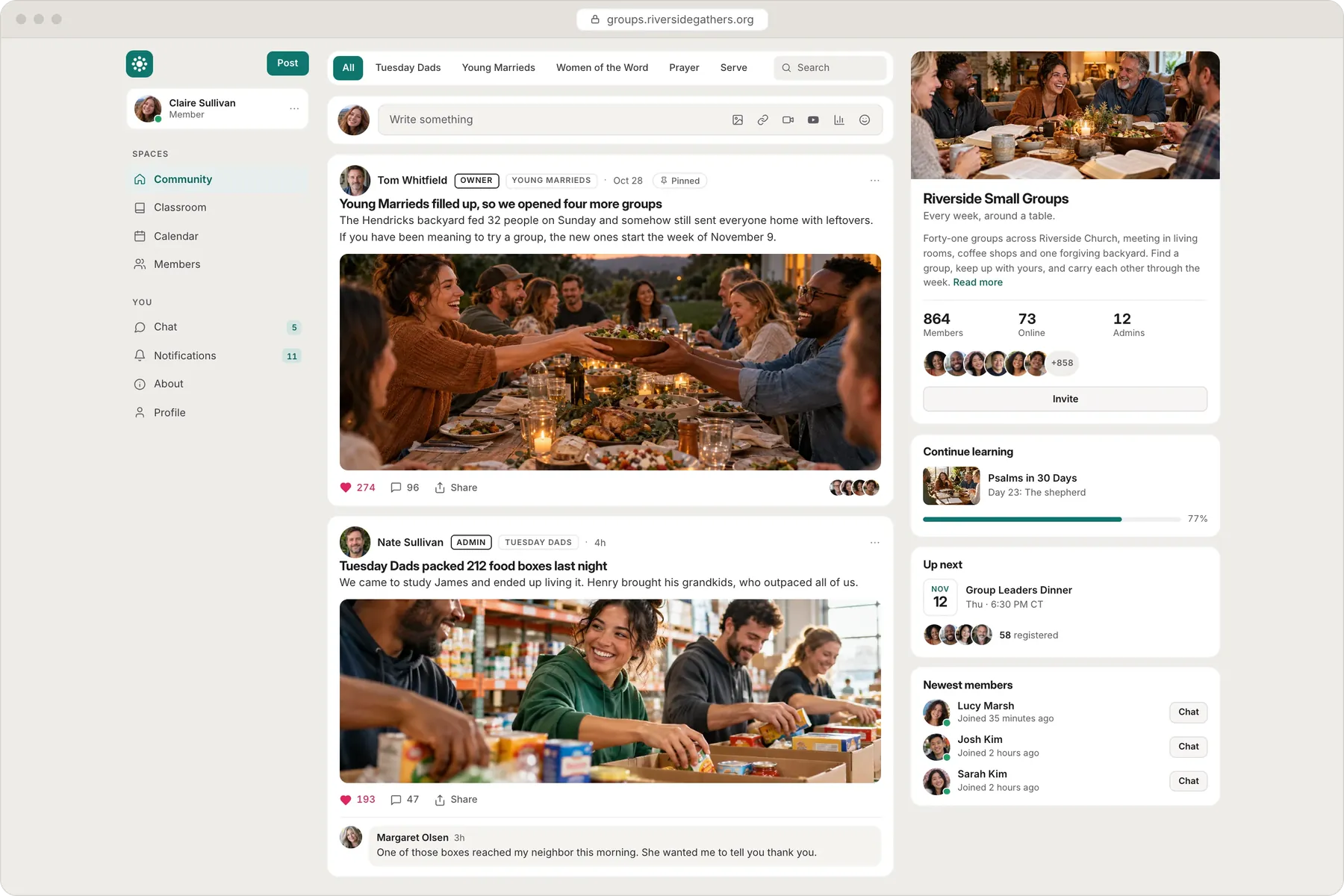
The home page shows your three newest members with a way to say hello. Greet each new member by name in the feed or in a direct message, and ask them to do the one thing your welcome post asks for.

Then ask each of your first members to invite one person they think would fit, and give them the join link to send. A member who brings a friend has a reason to come back the next day, because someone they know is now a member too.
Jakob Nielsen of Nielsen Norman Group wrote in 2006 that participation in online communities often follows a 90-9-1 pattern, where 1% of people write most of the posts and most members read more than they post. The work this week is to make posting easy for the people who are ready, with direct questions and replies to every post.
Week 4: follow up with everyone who said maybe
Some of the people you invited in week 1 said they were interested and did not join. Write to each of them again with a short message that mentions something specific happening in the community, such as the date of your free event or a conversation they would enjoy. Invitation links expire after seven days, so for anyone you invited by email, open Admin, then People, then Invitations, create the invitation again for the same address and send the new link. For new members, set a follow-up date on each record in People, and the Due follow-ups view lists everyone whose date has arrived.
Then make a list of ten people who already gather the audience you want: a podcast host, a newsletter writer, a group owner or a speaker in your field. In Traffic Secrets, Russell Brunson calls this list your Dream 100, and ten names are enough to start one. Offer each one something useful to their audience, such as co-hosting your next free event, and ask them to share its registration page.
From the first month to 100 members
Paul Mills reached 100 in about three months through personal invitations, early members who posted and members who invited their own networks. After the first month, repeat the four weeks with a fresh list of 30 names and a new event date.
Every step in this plan works on the Lockers Free plan, with unlimited members. When you are ready to sell a course or event tickets to the community you have built, Basic adds selling and unlimited hosted video for $7 a month, plus a 5% fee on each sale and Stripe processing.
Related guides
How to start an online community: a practical 7-step plan
A new community needs one clear reason for members to come back each week and a small founding group to test it with in the first month.7 min read
How to organize community categories so members know where to post
A short list of categories, each named for what members do there, shows a new member where to post first.5 min read