How much to charge for an online course, with real prices from 2026 listings
On November 3, 2026, the 33 priced courses among Gumroad's most-reviewed results for "course" had a median price of $50. The same day, the 89 priced courses on Maven's course page had a median of $1,175. Both sets are called courses, and the typical Maven course costs more than 20 times the typical Gumroad course, because most courses on Maven are taught live and the buyer pays for the instructor's time and feedback.
 By Ryan Scott, founder of LockersUpdated November 4, 20266 min read
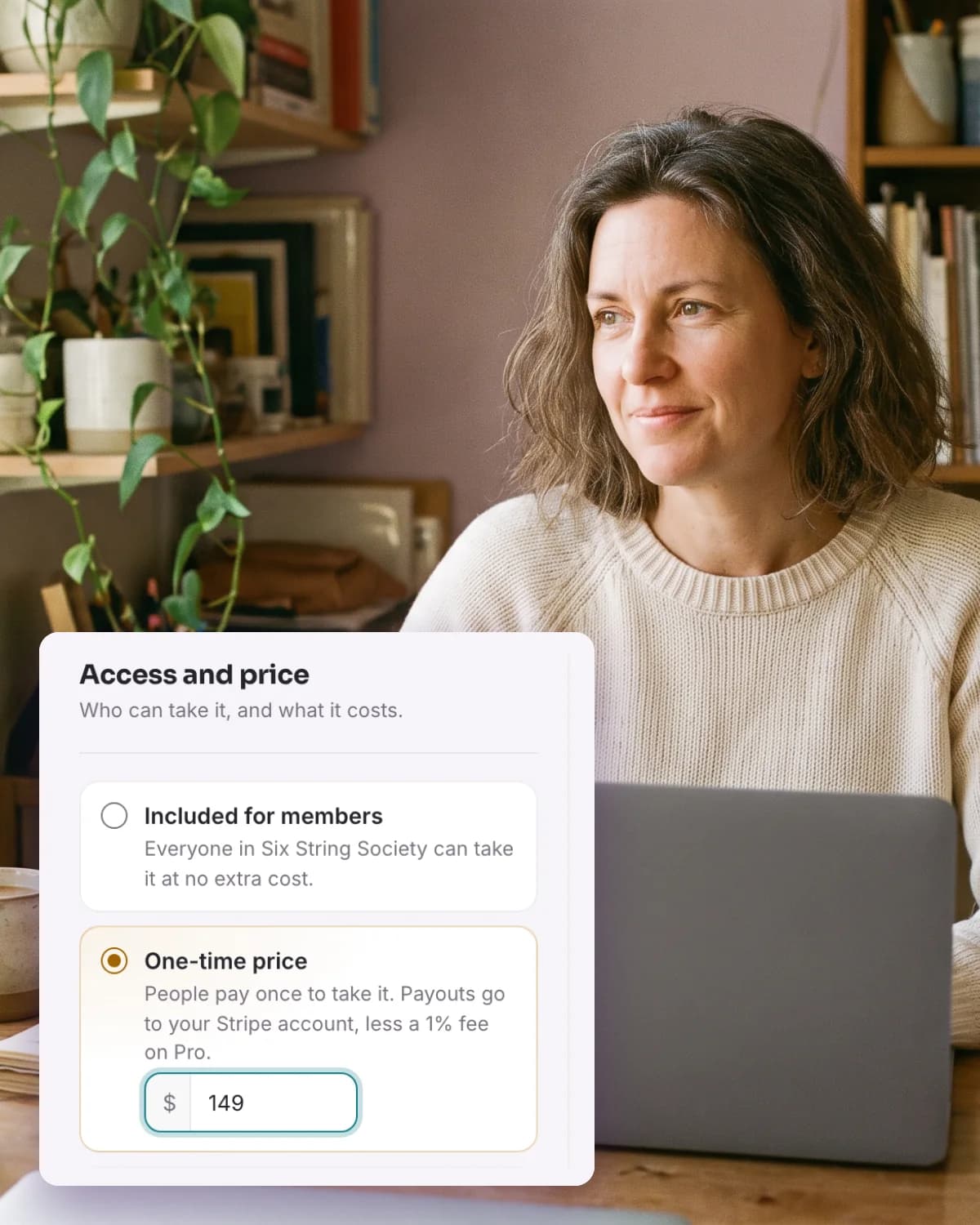
Course prices on Gumroad, Ruzuku and Maven in 2026
So the answer to how much you should charge starts with what your buyer gets. The more live time and feedback a course includes, the higher its band in the table below. Inside your band, the right price is the one that pays you well for a result your buyer can check, with an audience the size you have today.
| Where the prices come from | Courses | Middle half | Median |
|---|---|---|---|
| Gumroad, most-reviewed results for "course", priced in US dollars, November 3, 2026 | 33 | $25 to $97 | $50 |
| Ruzuku, courses with a one-time price on its platform, August 2026 | 11,691 | $49 to $357 | $150 |
| Maven, "For creators" course page, November 3, 2026 | 14 | $299 to $946 | $515 |
| Maven, main course page, November 3, 2026 | 89 | $795 to $1,999 | $1,175 |
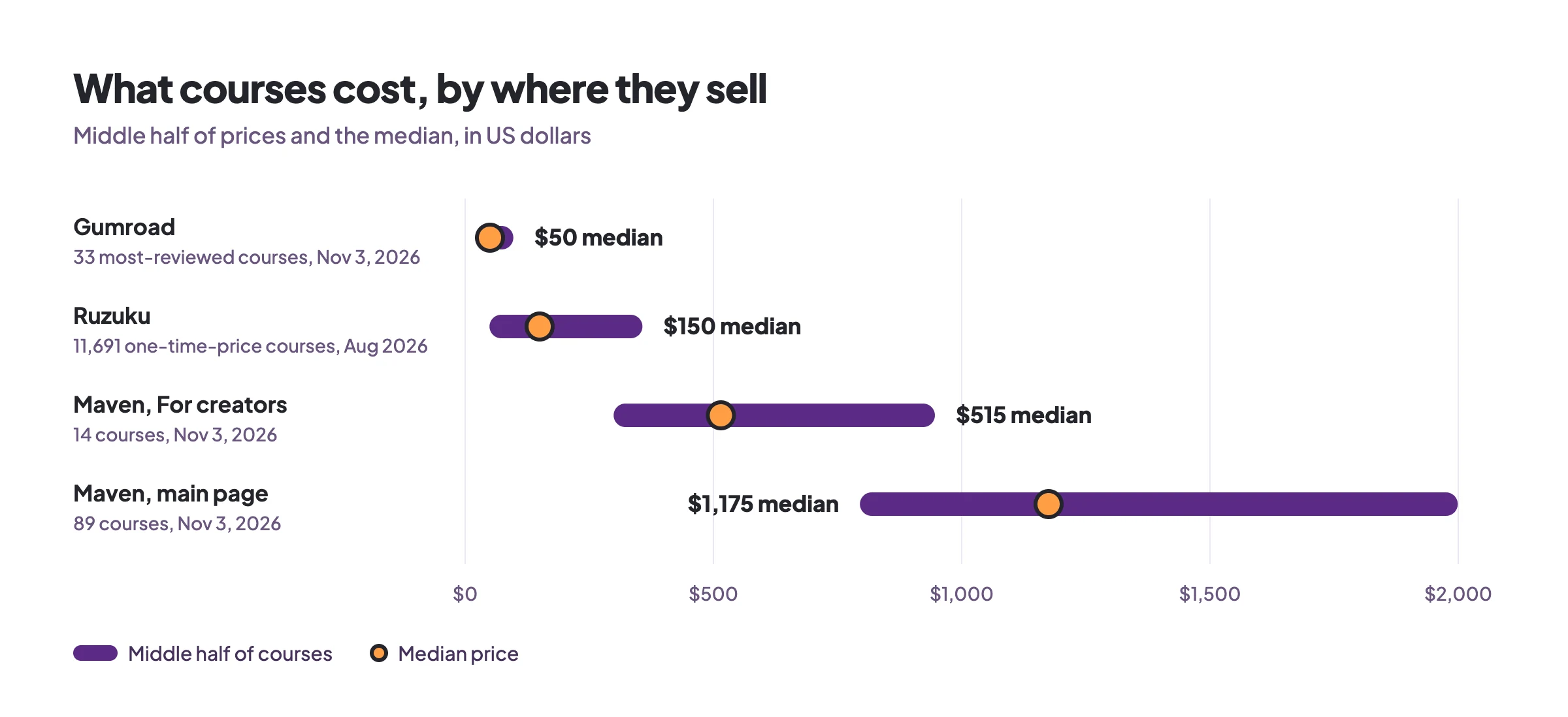
The middle half is the range that holds the middle 50% of the courses in each row, so it shows the price of a typical course in that row. On Gumroad, 27 of the 33 courses cost less than $100.
Topic changes the price too. In Ruzuku's August 2026 data, the median price in business and professional topics was $279, yoga $197, parenting $139, and coaching and mastermind programs $1,900. Maven's creator page covers subjects such as personal branding and short video, and its main page lists mostly career subjects such as AI engineering and product management, which is why the two Maven rows are so far apart.
The format of your course sets your price band
A live course sells your time in scheduled sessions and your feedback on each person's work, and a group can only grow so large before you can no longer reply to everyone. Each seat pays for part of that time, which is why Maven's own pricing guide, published September 2, 2026, puts live cohort courses at $800 to $2,450.
The guide sets the price within that range by the live hours and the depth of the project work. For a self-paced version that keeps the project work, feedback or office hours, and a group of peers, it suggests 70% to 85% of the live price. The format also changes how many people finish. In Ruzuku's data across 1.3 million enrollments, 53.4% of people in scheduled cohort courses completed them, compared with 41.9% in open self-paced courses.
Work backward from the income you want
Pick the amount you want one launch to bring in, then divide it by your price to see how many buyers you need.
| Course price | Buyers needed for $5,000 in sales |
|---|---|
| $50 | 100 |
| $150 | 34 |
| $515 | 10 |
| $1,175 | 5 |
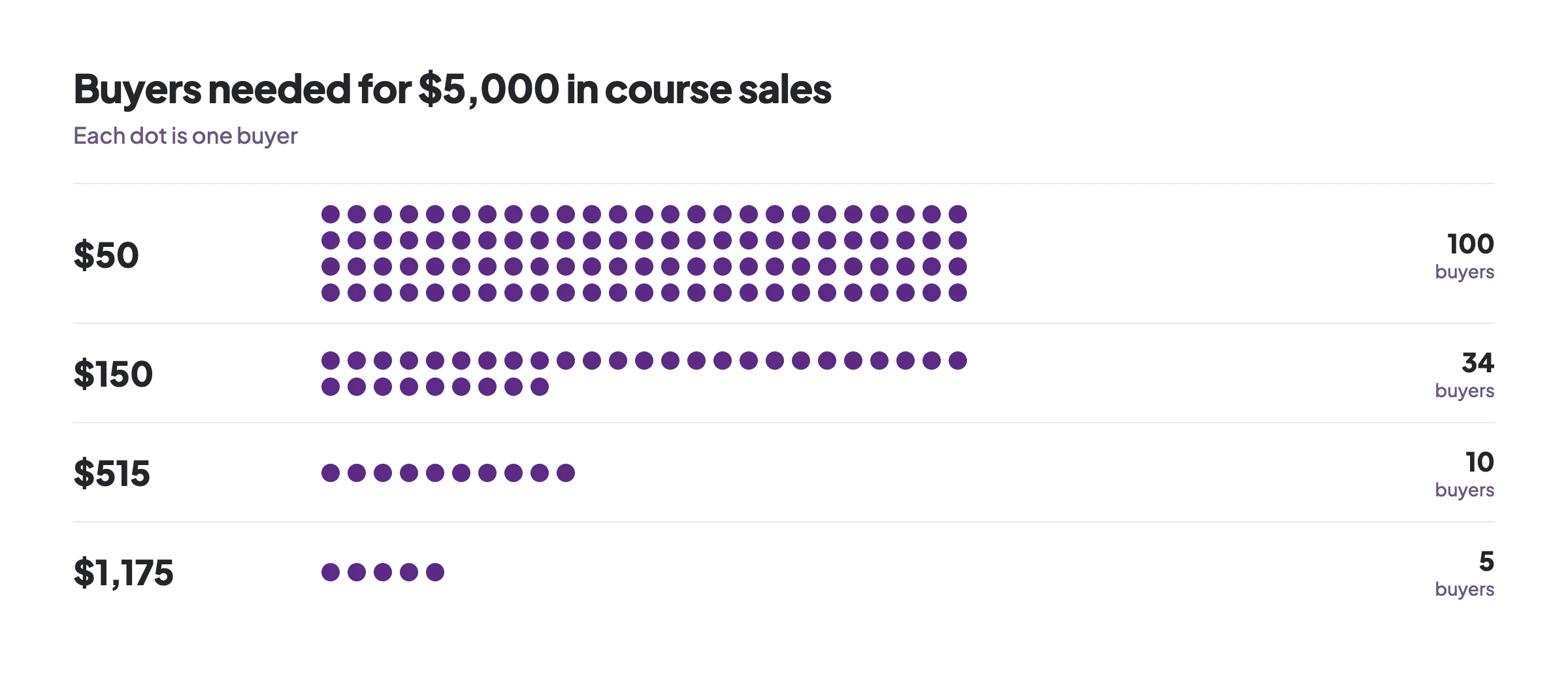
Now compare that buyer count with the people who already know you. If the people on your email list and in your group add up to a few hundred, finding 100 buyers for a $50 course asks a large share of them to buy. Finding 10 buyers for a $515 course with live sessions asks far fewer people to say yes, and each of those people gets more of your attention.
A small audience is a reason to price a course higher, because a higher price reaches your income goal with fewer buyers. Kajabi's own platform data, published in August 2026, found that creators whose top price was under $50 had typical lifetime earnings of $178. Creators with an offer of $2,500 or more had typical lifetime earnings of $174,730.
Give buyers more than one price
One course at one price leaves out the person who wants to spend less on a first purchase and the person who wants more of your help. Russell Brunson calls the fix a value ladder in DotCom Secrets: a set of offers that rise in price, so each buyer can start at the level that fits and move up when they are ready.
On Lockers, the first three offers work in one Locker that people join for free, and the fourth is a separate membership Locker on Pro that people pay to join:
A free event or a free preview lesson, so people can see how you teach before they pay.
A recorded course with a one-time price, for people who want to work at their own pace.
Tickets to a live workshop, for people who want your feedback.
A paid membership on Pro, monthly or yearly, that includes every course, for people who want ongoing access to you and all of your courses.
Members of a membership Locker pay one monthly or yearly price for every course inside it, and that Locker has its own Pro plan.
Pick your starting price in four steps
Write the result of your course in one sentence a buyer could check when they finish, such as "a finished outline for a business book" or "a first paying client." Buyers compare your price with the value of that result and with what it would cost them to reach it another way, so set your price against the result.
List what your buyers already pay you or others for the same result. If you charge $150 for a one-hour call and your course covers what you would say across four calls, a price under $600 is easy to explain to anyone who knows your call rate.
Find the row in the table that matches your course, using the Gumroad row for a recorded course buyers work through alone and the Maven creator row for a course with weekly live sessions and feedback. Then check the topic medians below the table.
Choose a price inside that band that you would still be glad to teach the course for months after launch, and check it against the buyer count you need.
Raise your price as buyers get results
Your first buyers' results show what the course is worth to people like them. Open near the middle of your band, and raise the price each time a new group of buyers reports results. On Lockers, a new price applies to people who buy after you publish it, and everyone who already bought keeps the course at the price they paid.
What you keep from each sale on Lockers
Selling on Lockers starts on Basic, at $7 a month or $70 a year for that Locker. A course can have a one-time price from $1 to $10,000. The Lockers platform fee is 5% of each sale on Basic and 1% on Pro, and Stripe charges its processing fee separately. On the $5,000 launch above, the Lockers fee comes to $250 on Basic and $50 on Pro.
Pro is $67 a month or $670 a year, and it adds paid memberships, quizzes, certificates, lesson scheduling and Live hosting with recording. On yearly billing, Pro costs less than Basic once your sales pass $1,250 a month, because the extra 4% you keep from each sale then adds up to more than the $600 difference in yearly plan price. Every plan, including Free, has unlimited members and unlimited courses, so you can build the course and invite your first members before you pay anything.
Set your course price on Lockers
Your Locker is free to start, and selling begins on Basic at $7 a month. You need an authenticator app on your Lockers account before you manage payments.
Create your Locker at lockers.social/start, or open the one you already run, and choose Basic or Pro from Admin.
Open Admin, then Sales, then Payments, and select Connect Stripe. You can put a price on a course once Stripe shows your account is ready for payouts.
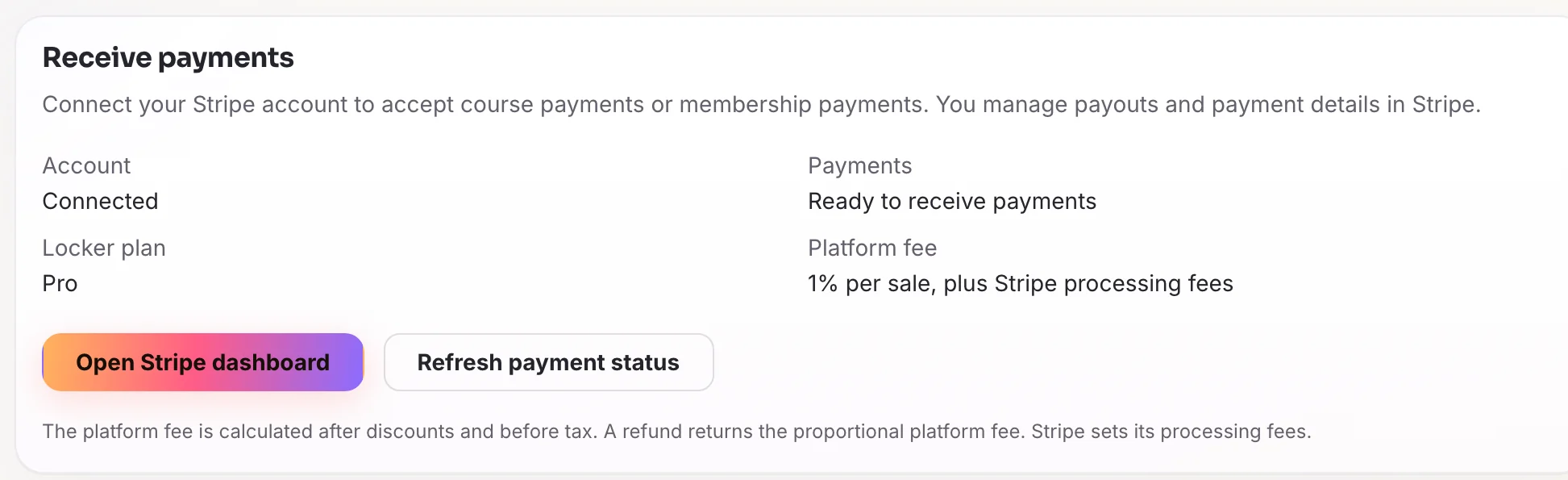
Once Stripe has your details, Receive payments shows the account as connected and ready. Open the course in Course studio, select Course details, then Change access, choose One-time price and type your price. Only the owner of the Locker can set or change a price.
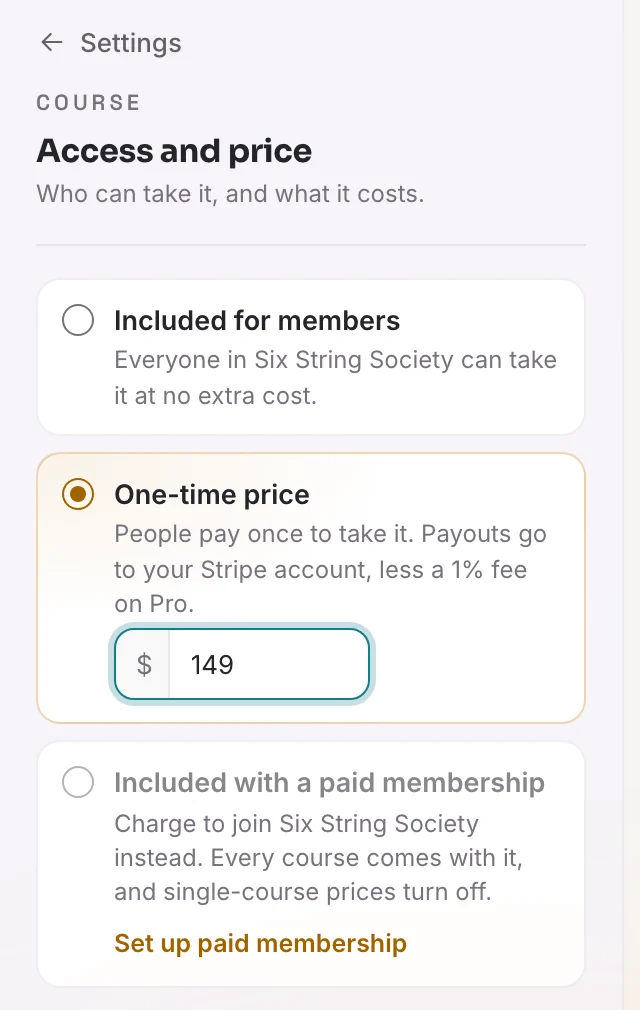
Choose One-time price and type the amount buyers pay once. To offer a free preview, select a lesson and turn on Free preview in Lesson settings. Members who have not bought the course can watch that lesson in full.
Select Publish to put the price live. On a course that is already published, the button reads Publish changes.
Related guides

How to create an online course
Turn what you already know into an online course. Plan the result, outline the lessons, record them with your phone, then set a price and sell it.6 min read
How to set course access, price, and release timing
Choose who can take a course and what it costs, offer a free preview lesson, and use the Pro settings that decide when each module and lesson opens.9 min read